
Stop typing test data.
DevFiller fills the form you're testing with realistic, fictional data in one click. It never submits anything, and it works without an account.
Free for Chrome. Recognizes English, French and Arabic labels.
Create your account
Runs the same generator as the extension, right here in your browser.
What it fills, and what it leaves alone
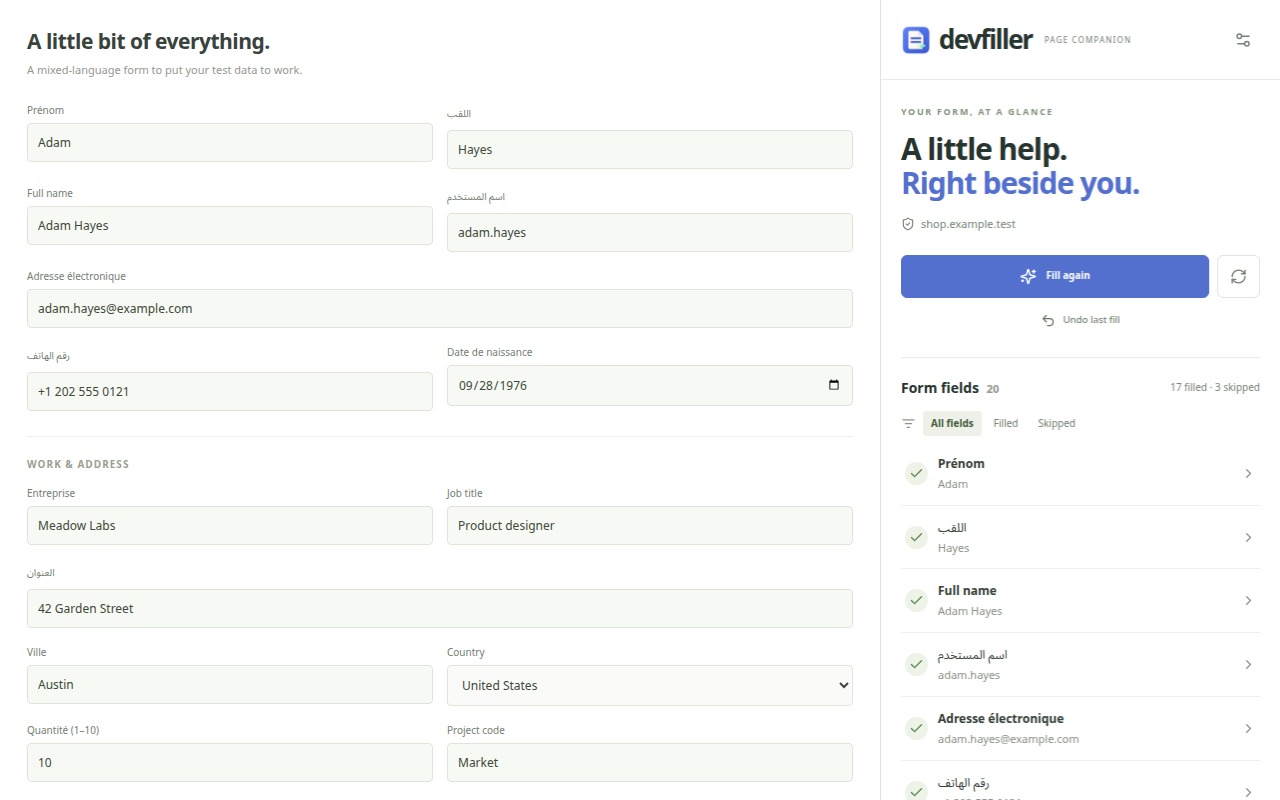
42 field types, matched by label, name, placeholder or autocomplete. Values fit together: the username and email follow the generated name.
Filled for you
- Identity
- Names, usernames, date of birth, age, gender, nationality
- Contact
- Emails at example.com, fictional phone numbers, websites
- Work
- Company, job title, department, industry, team size
- Address
- Street, apartment, city, state or wilaya, postal code, country
- Numbers and dates
- Quantities, prices, ratings, dates, times, colors, all within the field's limits
- Text
- Readable words and short sentences, never random strings
Left for you to handle
- Passwords, unless you turn test passwords on
- Payment card fields and one-time codes
- Consent, terms and newsletter checkboxes
- File uploads, hidden, disabled and read-only fields
- Search boxes and navigation controls
- Any field you exclude, on every site or just one
See every field beside the page
Open the side panel with Alt+Shift+F. It follows the tab you're on and shows exactly what happened.
- Every field, with a reason
- Filled, skipped, or incompatible, and why.
- Fix one field
- Save a custom value or exclude a field for this website.
- Undo last fill
- Restore the previous values, keeping anything you edited since.
Nothing leaves your browser unless you turn on AI
Settings stay in local extension storage. There is no DevFiller server, account or analytics, and the values you type are never sent anywhere.
If you add your own Groq or Gemini key, only field descriptions (labels, names, placeholders and limits) go to that provider, to suggest values for unusual fields.
Read the privacy policyRoadmap
The extension is the first step. Next, the same engine as a package you install in your test suite.
Chrome extension 1.0
AvailableOne-click filling, the side panel with undo, custom values, exclusions, English, French and Arabic, and optional AI with your own key. The Chrome Web Store listing is on its way; until then, install it from GitHub.
Install itdevfiller on npm
In designThe same field detection and data generator as a dev dependency, so your Playwright, Cypress and Vitest suites fill forms with realistic data instead of hard-coded strings.
Read the draftEdge and Firefox
PlannedStore releases for Microsoft Edge and Firefox, once each browser is tested end to end.
Repeatable and custom data
PlannedSeeded fills that produce the same data every run, custom generators for patterns, UUIDs and ranges, and support for frames, shadow DOM and custom dropdowns.